Top 5 Leave Management Tools for Modern Teams in 2025
Nov 28, 2025 • 8 min read
Your team member goes on vacation. Chaos ensues.
Sound familiar?
Leave management should be simple: person out → team knows who to contact → person returns → catches up quickly.
But most tools solve HR compliance (tracking PTO balances) and ignore the operational chaos (what happens day-to-day when someone’s actually gone).
We tested 15+ leave management solutions. Here are the 5 that actually solve the real problem.
What We Actually Needed
Before the rankings, here’s what matters for leave management:
HR Compliance (Table Stakes)
✅ Track PTO balances
✅ Approval workflows
✅ Calendar integration
Operational Reality (The Gap Most Tools Miss)
✅ Team knows who’s out
✅ Clear escalation paths when someone’s unavailable
✅ Minimal disruption to person on leave
✅ Easy catch-up on return
Most tools nail the first list. Almost none solve the second. Here’s who does:
1. BambooHR - The Enterprise Standard
What it does: Full HR platform with robust leave management
Best for: Companies with 50+ employees, formal HR processes
Key features:
- Comprehensive PTO tracking (multiple leave types)
- Approval workflows with manager delegation
- Calendar views (who’s out when)
- Integration with payroll systems
- Mobile app for requests/approvals
Strengths:
- Industry standard (your HR team already knows it)
- Handles complex leave policies (unlimited PTO, accruals, etc.)
- Excellent reporting and analytics
- Solid mobile experience
Weaknesses:
- Doesn’t solve day-to-day operational chaos
- No integration with communication tools (Slack, Teams)
- Expensive for small teams
- No prioritization system for incoming requests
Pricing: $6-12/employee/month (minimum commitment required)
Our take: If you need HR compliance and have budget, BambooHR is the safe choice. But you’ll still need something else for operational leave management.
2. Vacation Tracker - Slack-Native Solution
What it does: Leave requests and tracking directly in Slack
Best for: Slack-first teams who want simple leave tracking
Key features:
- Request time off via Slack command
- Manager approvals in Slack
- Team calendar view
- Balance tracking
- Sync with Google/Outlook calendars
Strengths:
- Lives where your team already works (Slack)
- Super easy adoption (no new tool to learn)
- Quick setup (under 30 minutes)
- Good for small-medium teams
Weaknesses:
- Limited to Slack (no standalone dashboard)
- Basic reporting
- Doesn’t handle what happens during someone’s leave
- No prioritization or communication management
Pricing: $99 lifetime (one-time payment for self-hosted version)
Our take: Great for simple PTO tracking in Slack. Doesn’t solve the “my inbox exploded while I was gone” problem.
3. Slackoff - Operational Leave Management
What it does: Manages the communications side of leave, not just the tracking
Best for: Teams where key people being unavailable causes operational chaos
This is different from others because: Instead of just tracking who’s out, Slackoff solves what happens when someone’s out.
How it works:
- Set leave dates + assign backup contact
- When someone tags you during leave: the app responds automatically and asks: “Is this High or Low priority?”
- High priority → Shows backup contact immediately
- Low priority → Logs for later, no escalation
- Return from leave → Get prioritized summary
Real-world scenario:
Without Slackoff:
- Sarah goes on vacation
- Team keeps tagging her (23 notifications)
- No one knows who to contact
- Work gets blocked
- Sarah returns, spends 2 hours sorting messages
With Slackoff:
- Sarah sets leave, assigns John as backup
- Team tags her (20 times)
- 4 marked High → John contacted immediately
- 16 marked Low → Logged, no one interrupted
- Sarah returns, reviews 4 urgent items in 15 minutes
Strengths:
- Solves the actual pain point (communication chaos)
- Forces prioritization (80% of messages aren’t urgent)
- Reduces backup burden (they only see urgent items)
- Clean return experience (prioritized summary)
- Works across all Slack channels automatically
Weaknesses:
- Slack-only (not a full HR platform)
- Doesn’t track PTO balances or accruals
- No approval workflows
- New tool (launching November 2025, validation phase)
Pricing: $99 lifetime for self-hosted version
Our take: If your pain point is “people return from vacation to chaos,” this is built specifically to solve it. If you need HR compliance, pair it with BambooHR or similar.
Try it: getslackoff.com
Why it’s #3 not #1:
- Brand new tool (November 2025 launch, still validating)
- Solves a specific problem (not full HR platform)
- Requires Slack (not platform-agnostic)
- Self-hosted first approach (trade-off: more setup vs. complete data control)
4. Timetastic - Simple Leave Tracking
What it does: Straightforward leave booking and calendar
Best for: Small teams (under 50) who want something simple and affordable
Key features:
- Visual calendar (who’s off when)
- Email-based requests and approvals
- Balance tracking
- Wallchart view (great for offices)
- Integration with Slack, Google Calendar, Outlook
Strengths:
- Dead simple to use
- Affordable
- Good for teams that value simplicity over features
- Nice visual interface
Weaknesses:
- Limited reporting
- No advanced workflows
- Doesn’t handle operational communication
- Email-based (feels old-school)
Pricing: $1-3/user/month
Our take: If you want bare-bones leave tracking without complexity, Timetastic is solid. But it won’t solve communication chaos.
5. Calamari - Feature-Rich Budget Option
What it does: Comprehensive leave and attendance tracking
Best for: Growing companies (20-200 employees) who need more than basic but can’t afford enterprise pricing
Key features:
- Multiple leave types and policies
- Approval workflows
- Attendance tracking (clock in/out)
- Integration with HR systems
- Detailed reporting
- Mobile app
Strengths:
- More features than simple tools
- Cheaper than enterprise solutions
- Good for international teams (multi-timezone support)
- Solid API for custom integrations
Weaknesses:
- UI feels dated
- Learning curve steeper than simpler tools
- Still doesn’t solve operational leave management
- Customer support mixed reviews
Pricing: $2-4/user/month
Our take: Good middle ground between simple trackers and enterprise platforms. But you’re still solving HR compliance, not day-to-day operations.
Comparison Table
| Tool | Best For | Key Strength | Missing | Price/User |
|---|---|---|---|---|
| BambooHR | Enterprise | Full HR platform | Operational chaos | $6-12/mo |
| Vacation Tracker | Slack teams | Native integration | Communication mgmt | $2/mo |
| Slackoff | Operational chaos | Priority-based comms | HR compliance | $49 lifetime |
| Timetastic | Small teams | Simplicity | Advanced features | $1-3/mo |
| Calamari | Mid-size growth | Feature/price balance | Modern UX | $2-4/mo |
The Two-Tool Strategy (What We Recommend)
Here’s the reality: No single tool solves everything.
The problem has two parts:
- HR Compliance: Track balances, approvals, policies
- Operational Management: Handle day-to-day when someone’s out
Our recommendation:
For Small Teams (<20 people)
Option A: Timetastic alone if budget is tight
Cost: $1-3/user/month
Trade-off: Manual operational management
Option B: Slackoff (self-hosted) for operational chaos
Cost: $99 one-time
Trade-off: Self-hosting setup vs. complete data control
For Medium Teams (20-100 people)
BambooHR (HR) + Slackoff (self-hosted, operations)
Cost: $6-12/user/month + $99 one-time
Why: Professional HR platform + operational chaos solved with full data control
For Large Teams (100+ people)
BambooHR or Workday + custom Slack workflows
Cost: Enterprise pricing
Why: Compliance is critical, operations are custom
What Most Companies Get Wrong
Mistake #1: Thinking leave management = PTO tracking
Tracking who’s out is 20% of the problem. Managing what happens during their leave is 80%.
Mistake #2: Ignoring the return experience
Person takes vacation → Returns to 50+ notifications → Spends 2 hours sorting → Productivity tank. Most tools ignore this entirely.
Mistake #3: Not measuring the cost
“It’s just vacation chaos, everyone deals with it.” Calculate:
- Hours spent sorting on return × employees × leaves per year
- Blocked work waiting for responses
- Wrong decisions made without key people
- The actual cost is $50K-150K+ annually for mid-size teams
Mistake #4: Choosing based on features, not pain points
“This tool has 47 features!” Do you need 47 features? Or do you need to solve 1-2 specific problems really well?
How to Choose
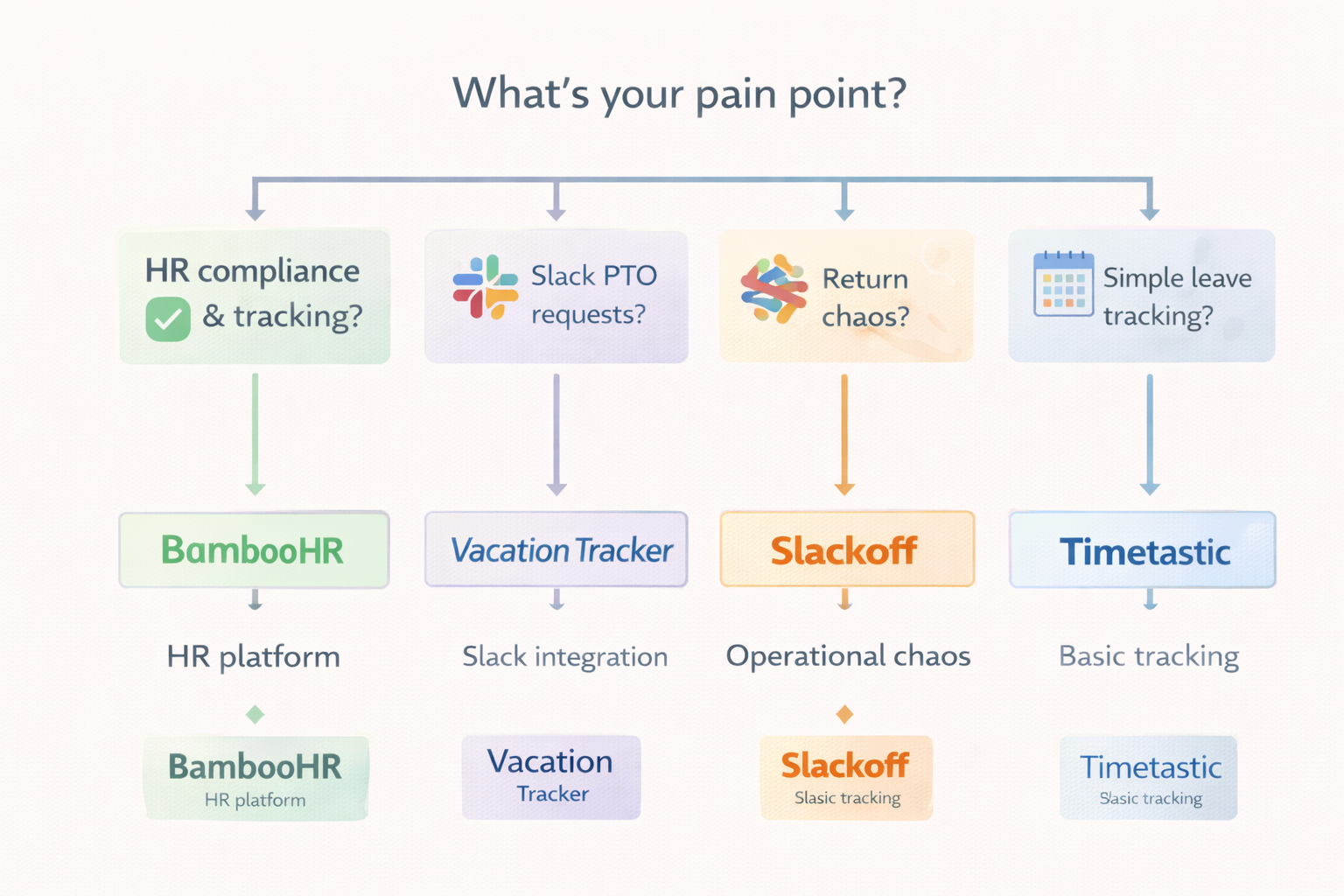
Step 1: Identify Your Pain Point
Is your problem:
- ❓ HR compliance and tracking? → BambooHR, Calamari
- ❓ Simple PTO requests in Slack? → Vacation Tracker
- ❓ Return-from-leave chaos? → Slackoff
- ❓ Just need basic tracking? → Timetastic
Step 2: Trial for 30 Days
Pick your top 2, run pilots with different teams. Measure adoption rate, time saved (specifically on return from leave), and team satisfaction.
Step 3: Calculate ROI
Formula:
(Time saved per leave × number of leaves × hourly cost) - (tool cost) = ROI
If ROI is negative, wrong tool.
The Future of Leave Management
What we expect to see:
- AI-powered prioritization - Auto-detect urgent vs casual messages
- Handoff automation - Automatically brief backup on context
- Predictive coverage - Suggest who to assign as backup based on expertise
- Integration everywhere - Slack, Teams, email, calendar, all connected
The trend: Moving from “tracking time off” to “managing operational continuity.”
Bottom Line
If you need:
- ✅ Full HR platform → BambooHR
- ✅ Simple Slack tracking → Vacation Tracker
- ✅ Operational leave management → Slackoff
- ✅ Basic budget option → Timetastic
- ✅ Mid-market balance → Calamari
Our setup (planning phase, launching November 2025):
Targeting validation with self-hosted approach • Focus: Operational leave management for Slack teams • Pricing: $99 one-time (self-hosted with full source code) • Goal: Validate problem-solution fit before scaling
The real answer: Use the tool that solves your actual pain point, not the one with the most features.
What leave management tool does your team use? What’s working (or not)? Drop a comment.
Try Slackoff →