Top 5 Slack Apps for Team Productivity in 2025
Dec 10, 2025 • 6 min read
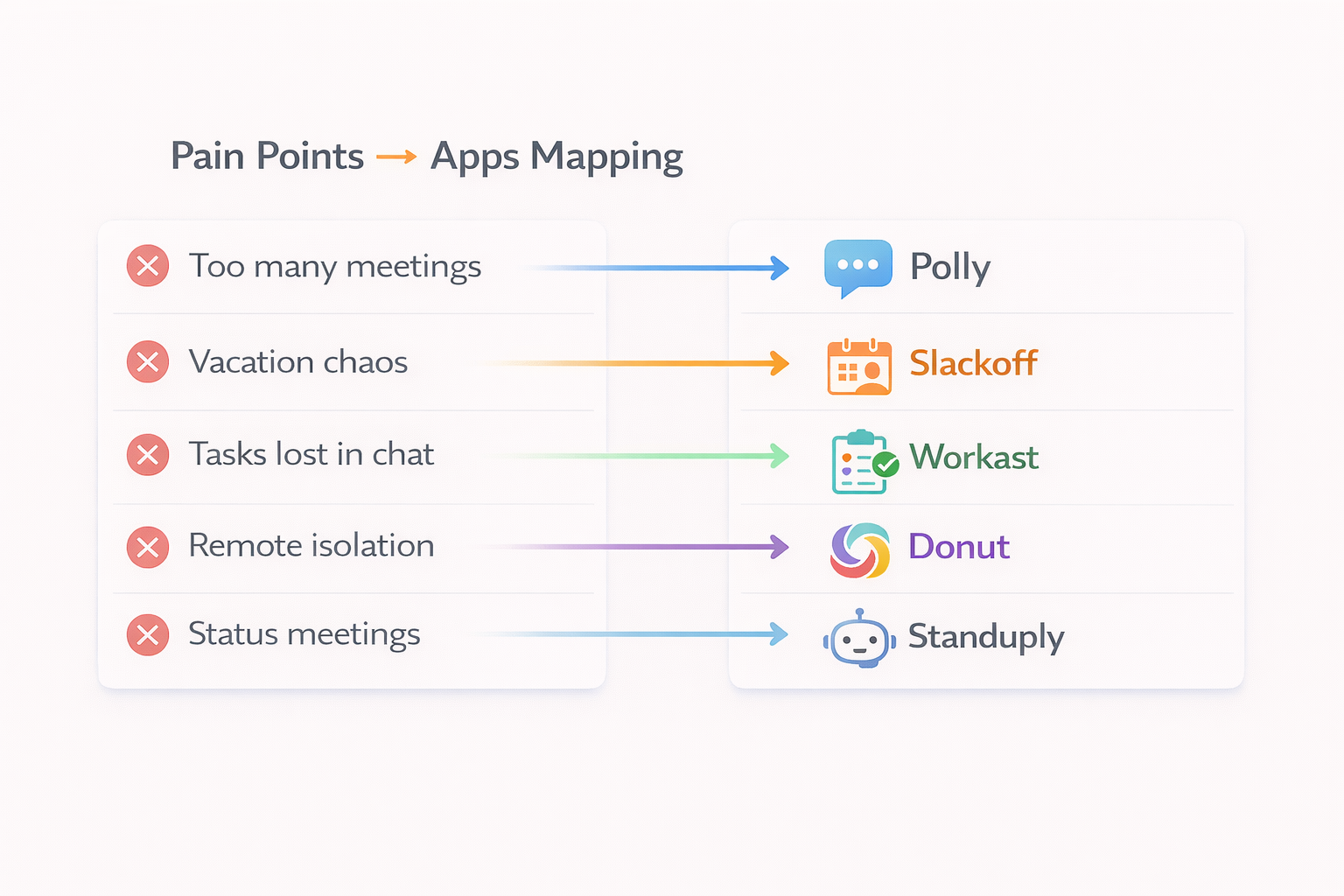
Your Slack workspace has potential to be a productivity powerhouse -or a chaotic mess of notifications and scattered conversations.
The difference? The right apps.
We tested 50+ Slack apps over the past year. Here are the 5 that actually delivered measurable productivity gains for our team.
What We Looked For
Before diving in, here’s our criteria:
- ✅ Solves a real pain point (not just “nice to have”)
- ✅ Easy setup (under 10 minutes)
- ✅ Doesn’t add notification noise
- ✅ Team actually uses it (adoption > 70%)
- ✅ Clear ROI (time or money saved)
1. Polly - Team Polls & Surveys
What it does: Create polls, surveys, and Q&As directly in Slack
Why it’s #1:
- Makes decision-making async (no more “quick sync” meetings)
- Anonymous responses option (get honest feedback)
- Templates for common use cases (retros, pulse checks, lunch orders)
Real impact:
- Reduced “alignment meetings” by 40%
- Get team input in minutes, not hours
- Works great for remote/hybrid teams
Best for: Product teams, managers, anyone making group decisions
Pricing: Free for basic polls, $2/user/month for advanced features
Setup time: 2 minutes
Our take: If you’re still scheduling meetings to decide where to get lunch, you need Polly.
2. Slackoff - Leave Management
What it does: Intelligently manages communications when team members are on leave
Why it made our list: Most Slack apps solve communication. This one solves not communicating -specifically, what happens when someone’s unavailable.
How it works:
- Team member sets leave dates + assigns a backup contact
- When someone tags them, app asks: “Is this High or Low priority?”
- High priority → Backup contact info shown immediately
- Low priority → Logged for when they return
- Person returns to a clean, prioritized summary
Real impact:
- Early testing shows potential to save 1+ hour per return from leave
- Designed to reduce “who do I contact?” questions by up to 80%
- Helps teams actually disconnect during vacation
Built by: A designer who faced this exact problem in November 2025
Best for: Any team where key people take vacation (so… everyone?)
Pricing: $99 lifetime (one-time payment)
Setup time: 5 minutes
Our take: This should be a native Slack feature, but it’s not. Slackoff fills that gap perfectly. The ROI is immediate -if you value your team’s time and wellbeing.
Try it: getslackoff.com
3. Donut - Team Connection & Onboarding
What it does: Randomly pairs team members for virtual coffee chats
Why it works: Remote teams struggle with serendipitous connections. Donut automates the randomness.
How it works:
- Pairs people weekly/bi-weekly
- Suggests conversation starters
- Tracks participation
- Customizable for different groups (new hires, cross-functional, etc.)
Real impact:
- New hires report 60% faster “feeling connected”
- Cross-team collaboration improved
- People actually enjoy it (high participation rates)
Best for: Remote teams, companies with poor cross-team interaction
Pricing: Free for basic, $3-5/user/month for advanced
Setup time: 5 minutes
Our take: Feels gimmicky at first. Then you realize it genuinely builds relationships that wouldn’t happen otherwise.
4. Workast - Task Management in Slack
What it does: Turn Slack messages into tasks without leaving Slack
Why it’s useful: How many times have you said “I’ll do that” in Slack and then forgotten? Workast solves this.
How it works:
- Convert any message to a task (one click)
- Assign to team members
- Set due dates and priorities
- See all tasks in one view
- Integrates with existing tools (Trello, Asana, etc.)
Real impact:
- Reduced “what was I supposed to do?” questions
- Tasks don’t get lost in channel history
- Accountability without micromanagement
Best for: Teams drowning in Slack messages, project managers
Pricing: Free for basic, $4/user/month for teams
Setup time: 5 minutes
Our take: If your team uses Slack for coordination but tasks keep slipping, this is your solution.
5. Standuply - Async Standups & Check-ins
What it does: Automated daily standups and team check-ins
Why it matters: Daily standup meetings are productivity killers for distributed teams. Standuply makes them async.
How it works:
- Bot asks questions at scheduled times
- Team responds when convenient
- Aggregates answers in a thread or channel
- Customizable questions and schedules
Real impact:
- Eliminated 5 hours/week of synchronous standup meetings
- Better participation (people actually think about answers)
- Permanent record of updates (easy to reference)
Best for: Remote teams, agile teams, distributed organizations
Pricing: Free for basic, $1.50/user/month for advanced
Setup time: 10 minutes
Our take: Async standups are the future. This tool does them right.
Honorable Mentions
Apps that almost made the list:
Geekbot - Similar to Standuply, slightly different UX
Guru - Knowledge management, great for documentation
Statsbot - Analytics dashboards in Slack
Lunch Train - Coordinates lunch orders (surprisingly useful)
Simple Poll - Lighter alternative to Polly
How to Choose the Right Apps for Your Team
Don’t just install apps because they sound cool. Here’s our framework:
Step 1: Identify the Pain Point
Ask your team:
- What takes unnecessary time?
- What causes frustration?
- What communication breaks down?
Step 2: Trial Period (2-4 Weeks)
- Install with a specific team/channel first
- Set success metrics (time saved, adoption rate, etc.)
- Gather feedback weekly
Step 3: Measure Impact
Good metrics:
- Time saved per week
- Reduction in meetings
- Team satisfaction scores
- Actual usage rates
Bad metrics:
- “It seems useful”
- “Some people like it”
- “It has good reviews”
Step 4: Kill or Scale
If adoption is <50% after 4 weeks, kill it.
If it’s genuinely useful, scale to whole company.
The Apps We Tried and Rejected
Transparency time: Here are apps that sounded great but didn’t work for us:
Time zone converters - Solved a problem we didn’t have
Gif/meme generators - Fun but distracting
Complex workflow builders - Too much setup overhead
Meeting schedulers - Google Calendar already works
Your mileage may vary.
Bottom Line
The best Slack apps are the ones you forget you’re using -they just make work smoother.
Our top 5:
- Polly - Async decision-making
- Slackoff - Leave management
- Donut - Team connection
- Workast - Task management
- Standuply - Async standups
Combined impact for our 20-person team:
- ~15 hours/week saved in meetings
- Better cross-team collaboration
- Reduced communication chaos
- Happier, more productive team
Total cost: ~$150/month
ROI: Massive
What Slack apps does your team swear by? Let us know in the comments.
Try Slackoff →